Best Free Trading Journals in 2026: Free Plans Compared
The best free trading journals are the ones whose limits fit how you trade. This page compares the free options we have recorded, with check dates, on trade caps, accounts, history and import. We do not rank them, and The Trading Terminal, which publishes this page, is one of them. Updated 18 October 2026.
By Harrison Weaver, founder of The Trading Terminal
What counts as a free trading journal?
A free trading journal is one with a free plan or free version, not a time-limited trial, and with limits that still let you journal. That excludes free trials, which end after a set period, and tools that are free only for a few trades. It includes spreadsheets, journal software with a free plan, and open-source or self-hosted journals that you run yourself.
This page compares the free options we have recorded. It does not rank them, and it states plainly which details we have not been able to re-check. The Trading Terminal publishes this page and is one of the journals listed. For the full picture of one free plan, see the free trading journal page, and for paid and free tools together see best trading journals.
Which free trading journals have we recorded, and when?
Each row shows what we last recorded and the date. Only The Trading Terminal's row was checked on 12 October 2026, against the app itself. Competitor prices are in US dollars; ours are in Australian dollars, and we do not convert.
| Journal | Free plan | What we recorded | Last checked |
|---|---|---|---|
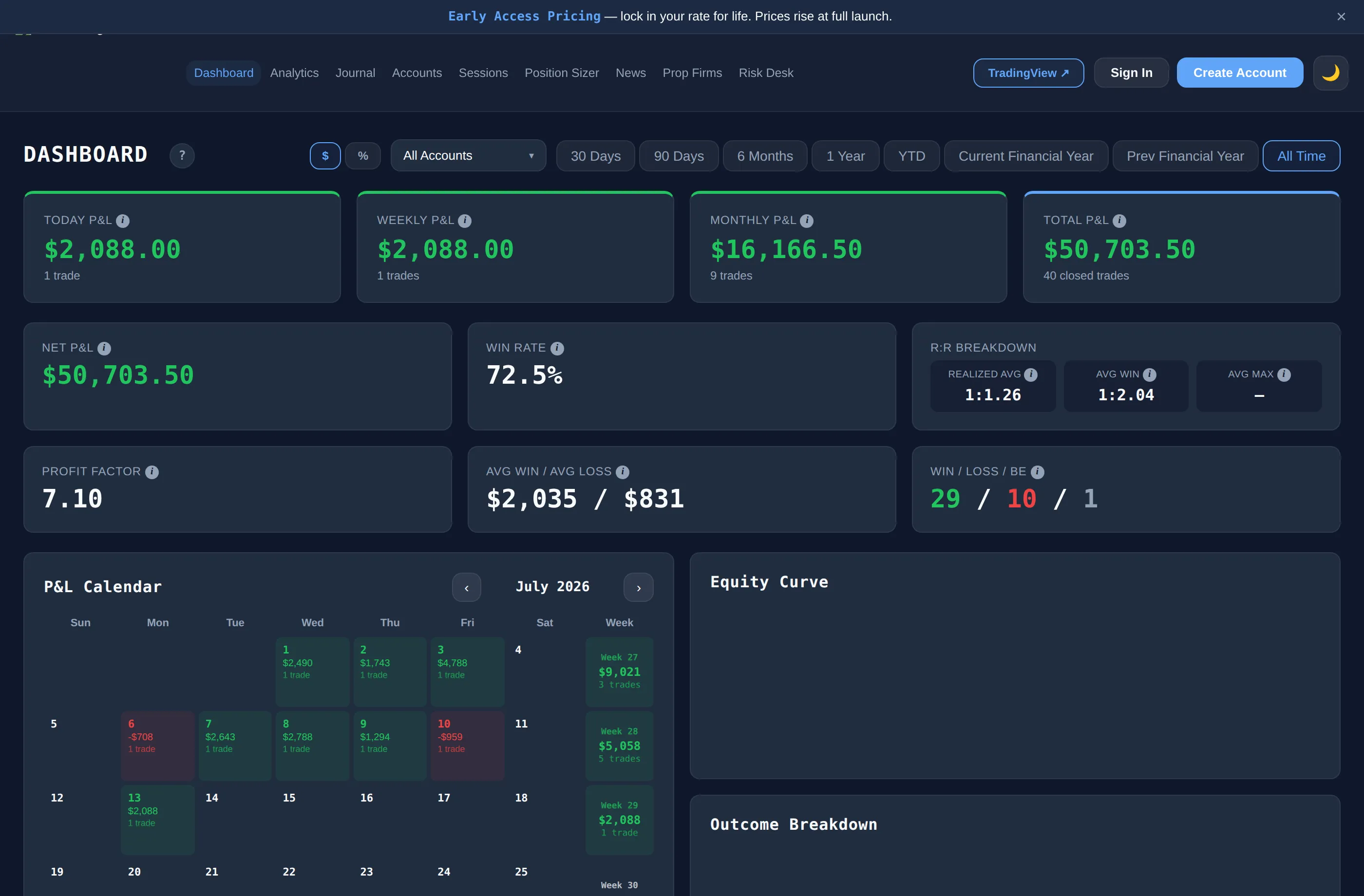
| The Trading Terminal | Yes, A$0 with no card | 1 account, up to 30 trades a month, 90 days of dashboard history, 1 screenshot per trade, CSV import and export. Analytics, Risk Desk and Trade Lab are paid. No ads | 12 October 2026, from the app |
| TradesViz | Yes, limited | Free tier covered stocks only, with 1 account and 3,000 executions a month. Forex, futures and crypto needed a paid plan | 14 September 2026. Not re-checked |
| Myfxbook | Yes | Free forex and CFD account tracking with MT4/MT5 sync and public track records. Analytics rather than a discretionary journal; no setup or psychology fields | 14 September 2026. Not re-checked |
| Spreadsheet (Excel, Google Sheets) | Yes | No cap on trades, but every statistic is a formula you maintain. See the free templates below | Not applicable |
Journals we recorded without a free plan, so they are not in the table above:
- TradeZella. No free plan and no free trial. Paid plans from US$35 a month. Checked 5 October 2026 against TradeZella's pricing page.
- TraderSync. Free plan removed; a 7-day trial without a card. Paid plans from US$29.95 a month. Checked 5 October 2026 against a third-party review.
- Edgewonk. An annual fee of about US$197 with a 14-day money-back guarantee. Last researched 14 September 2026; not re-checked.
Tradervue and Trademetria also appear on best trading journals with the dates they were last researched (July and September 2026). We have left them out of this table because we hold no recorded source for their free-plan details.
How do you choose between free trading journals?
These questions matter more than any feature list. The right answer depends on you, which is why there is no ranking:
| If this describes you | Look at | Why |
|---|---|---|
| You take a handful of trades a week | Monthly trade caps | A cap of 30 trades a month is comfortable at that pace |
| You take dozens of trades a day | Caps first, or a spreadsheet | A cap can be reached in days |
| You trade live and a prop firm account | Account limits | A single-account plan means choosing one |
| Your platform exports a CSV | Import presets and column mapping | A good import saves most of the typing |
| You want to review by setup and mistake | Whether analytics are free or paid | On The Trading Terminal the Analytics page is paid |
| You plan to keep data for years | History window and export | A short history window hides older trades |
What is the free spreadsheet alternative?
A spreadsheet is the only free journal with no cap at all. Our free trading journal template is an Excel workbook with working formulas, a Summary sheet and a fictional example row. It opens in Excel and, by upload, in Google Sheets. There are versions for forex, futures, crypto, gold, oil, indices, day trading, swing trading, prop firm, demo, backtesting and ICT trading, and each has different columns and formulas.
The template's weakness is the same as every spreadsheet's: it will not show you a chart of results by setup or session unless you build one, and you re-type each trade. If you want that done for you, try a free plan as well and keep whichever one you actually update.
What do you give up on The Trading Terminal's free plan?
- Trades are capped at 30 a month, counted by trade date and including imports.
- One account, and the dashboard shows the last 90 days.
- The Analytics page (60+ views, Mistake Cost Analysis, Trader DNA and Edge Score) is on Pro, A$19 a month or A$189 a year.
- Risk Desk, Trade Lab and automatic cTrader and MT4/MT5 imports are on Elite, A$29 a month or A$249 a year.
- There are no AI features, no trade replay and no native mobile app on any plan.