
An MT5 Trading Journal With a Free Expert Advisor
Attach a free Expert Advisor to MetaTrader 5 and your trades are sent to the journal as they open and close, read-only, with analytics built from the closed ones. Updated 18 October 2026
How the MT5 Connection Works
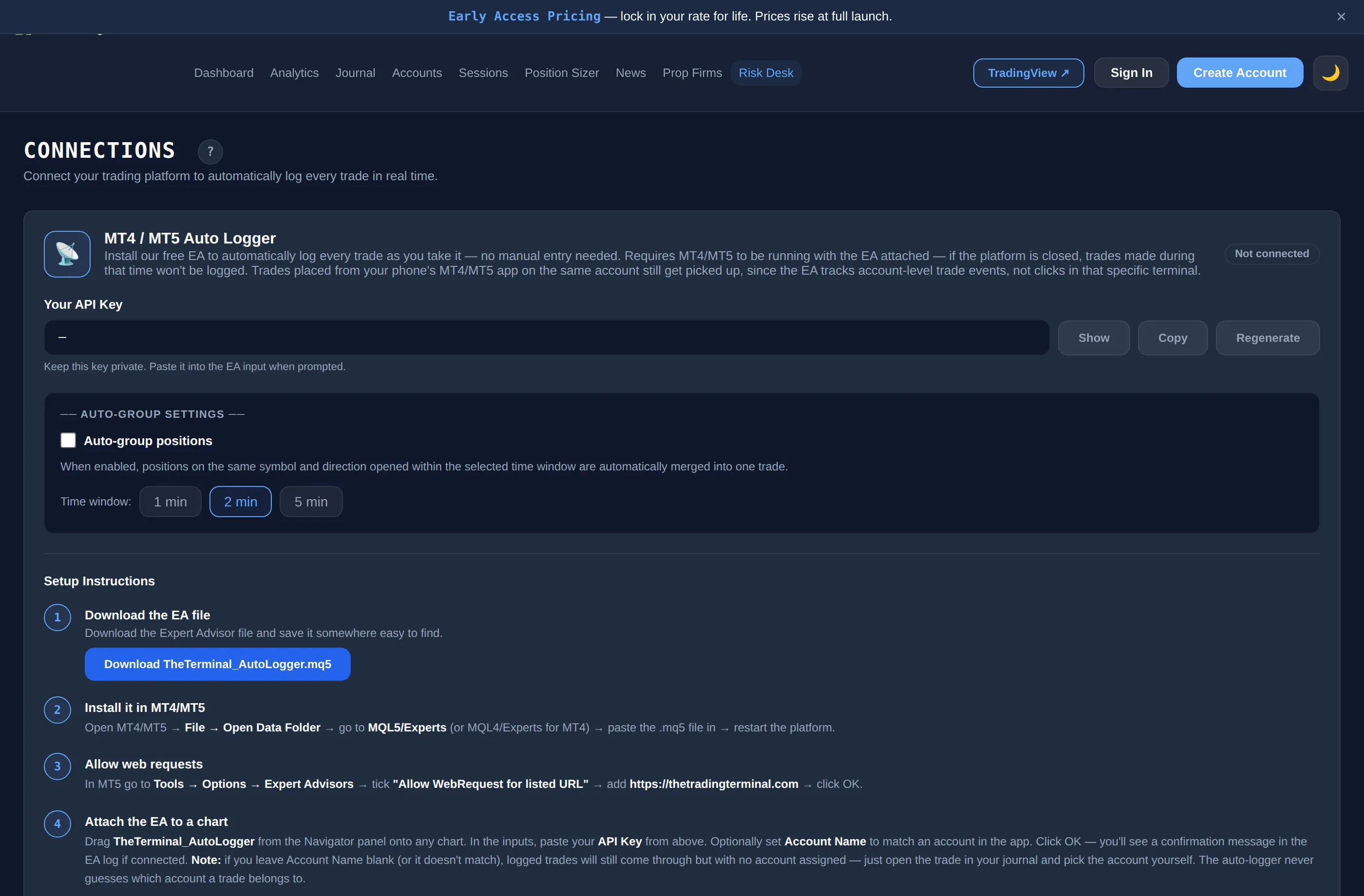
MT5 does not have a login-based connection, so The Trading Terminal uses a free Expert Advisor (EA), TheTerminal_AutoLogger, that you download from the Connections page. The EA sends your trades to your journal over HTTPS while it is attached to a chart and the platform is running.
- Download. Get the .mq5 file from Connections and copy it into the MQL5/Experts folder (File → Open Data Folder), then restart the platform.
- Allow web requests. In Tools → Options → Expert Advisors, tick Allow WebRequest for listed URL and add https://thetradingterminal.com.
- Attach the EA. Drag it onto any chart, paste your API key from the Connections page and optionally set the Account Name to your broker name, or to the full account name exactly as shown under Accounts → Edit in the app (account cards can show it masked, so do not copy it from the card). If you leave the name blank, trades still arrive but unassigned and you pick the account yourself.
- Deal-by-deal reporting. On MT5 the EA reacts to each deal the platform records and sends a close event for each closing deal, with the open price and open time looked up from the position history.
What the EA Sends
By default the EA reports two events: when a trade opens and when it closes (both can be switched off in the EA inputs). It also sends a test ping when it starts so you can see whether the connection works.
| Event | What is sent |
|---|---|
| Open | Ticket, symbol, buy or sell, lots, open price, stop loss, take profit, open time and the account name |
| Close | The same fields plus close price, profit, commission, swap and close time |
A trade that is still open shows in the journal as an open trade, and it counts in analytics only once it has closed, because win rate, expectancy, profit factor and the other metrics are calculated from closed trades. When auto-group is on, positions on the same symbol and direction opened within a window you choose (1, 2 or 5 minutes) merge into one trade.
Limits to Know About
- It only works while the platform and EA are running. If MetaTrader is closed, trades are not sent. A VPS is one way people keep it running; it is not required by The Trading Terminal.
- No history backfill. The EA reports trades as they happen after it is attached. Trades from before that can be added with a CSV import.
- It sends data out only. The EA code contains no order functions: it does not place, modify or close trades.
- Elite only. The Auto-Logger EA is part of the Elite plan.
If you also use cTrader, see the cTrader trading journal page, which needs no EA. For MT4 see the MT4 trading journal page.
What You Can Analyse Once Trades Are In
Trades from the EA feed the same views as manual entries: trading analytics, Trader DNA, the Edge Score and Mistake Cost Analysis, and Risk Desk, which tracks daily loss and drawdown from closed trades. See how we calculate for the definitions, and the forex trading journal page for what to log on each trade.