
ICT Trading Journal: Log Killzones, Bias and Entry Models
An ICT trading journal records what ICT and smart money concepts traders rely on: higher time frame bias, killzone, liquidity taken, the entry model (such as a fair value gap or order block) and whether you followed your rules. Use the Setups and Confluences manager in The Trading Terminal or a free Excel template. Updated 18 October 2026.
By Harrison Weaver, founder of The Trading Terminal
What is an ICT trading journal?
An ICT trading journal is a trade log built for the ICT and smart money concepts style of trading. Alongside entry, exit and result it records the pieces that style depends on: higher time frame bias, killzone, the liquidity taken, the entry model such as a fair value gap or order block, and whether your rules were followed. It turns a labelled chart into data you can compare across hundreds of trades.
ICT stands for Inner Circle Trader. This page is about journaling, not about whether the method works: a journal is how you find out from your own results. The Trading Terminal is independent and is not affiliated with ICT or its creator.
What should you log on every ICT trade?
Eleven fields cover the trade without turning journaling into a second job. The right-hand column is a fictional example.
| Field | Why it is worth logging | Fictional example |
|---|---|---|
| Higher time frame bias | Shows whether you trade with or against your own read of direction | Bullish (daily) |
| Killzone or session, with timezone | Time of day is part of the model, so it has to be comparable | New York AM (New York time) |
| Liquidity taken first | Records the sweep that preceded the entry | Sell-side liquidity below the London low |
| Structure confirmation | Separates entries after a shift from entries before one | Market structure shift on the 1-minute chart |
| Entry model or PD array | The setup tag your results will be grouped by | FVG retest |
| Confluences | Extra reasons, kept as short tags | HTF order block, SMT divergence |
| Entry, stop, target, exit | Needed for planned and actual R | 17,420 / 17,400 / 17,480 / 17,470 |
| Risk and result in R | Makes trades comparable across instruments | 1R = $100, result +2.5R |
| Rules followed? | Separates a bad outcome from a bad decision | Yes |
| Mistake tag | Names the rule you broke, if any | None |
| Screenshot with your marks | Lets you check the labels later without hindsight | Entry and exit charts |
Killzone hours differ between sources, so write down the hours and the timezone you use and keep them fixed. A killzone label that changes meaning half way through the year makes the data useless.
What does a filled-in ICT journal entry look like?
| Field | Winning trade | Losing trade |
|---|---|---|
| Date and instrument | 6 Jan 2026, NQ, long | 8 Jan 2026, NQ, long |
| Killzone and bias | New York AM, daily bias bullish | New York AM, daily bias neutral |
| Liquidity taken | London low swept before the open | None clear |
| Entry model | MSS then FVG retest | First FVG, before any shift |
| Entry, stop, exit | 17,420, 17,400, 17,470 | 17,455, 17,435, 17,435 |
| Result | +2.5R | -1R |
| Rules followed? | Yes | No |
| Mistake tag | None | No Confirmation |
| Note | Waited for the sweep and the shift. Did not touch the stop after entry. | Entered the first gap because price was moving. My model needs a shift first. |
The losing entry is the more useful one. Tagged as No Confirmation, it will show up beside every other trade you took without waiting for the shift, and the total of those trades is a number you can act on.
How do you set up an ICT journal in The Trading Terminal?
The journal does not need anything ICT-specific, because the fields you tag are yours:
- Open Setups & Confluences. The starter lists include FVG, iFVG, BOS, MSS, OB, Liquidity Sweep and EQ Retest; add your own, such as Breaker Block or SMT Divergence, and remove what you do not use.
- Choose your mistake tags. The starter list has No Confirmation, Early Entry, Chased Entry, Moved SL, Skipped Confluence and Break of Plan, and you can add more.
- Log each trade with its setup (you can pick more than one), confluences, risk, a grade, emotion and discipline ratings, and a screenshot.
- Write the killzone as a custom tag (Pro), in the setup name or in the notes. The session field fills in from the entry time.
- Review weekly: results by setup, by session and by mistake. Pro adds Trader DNA, which groups closed trades by setup, session, instrument and direction.
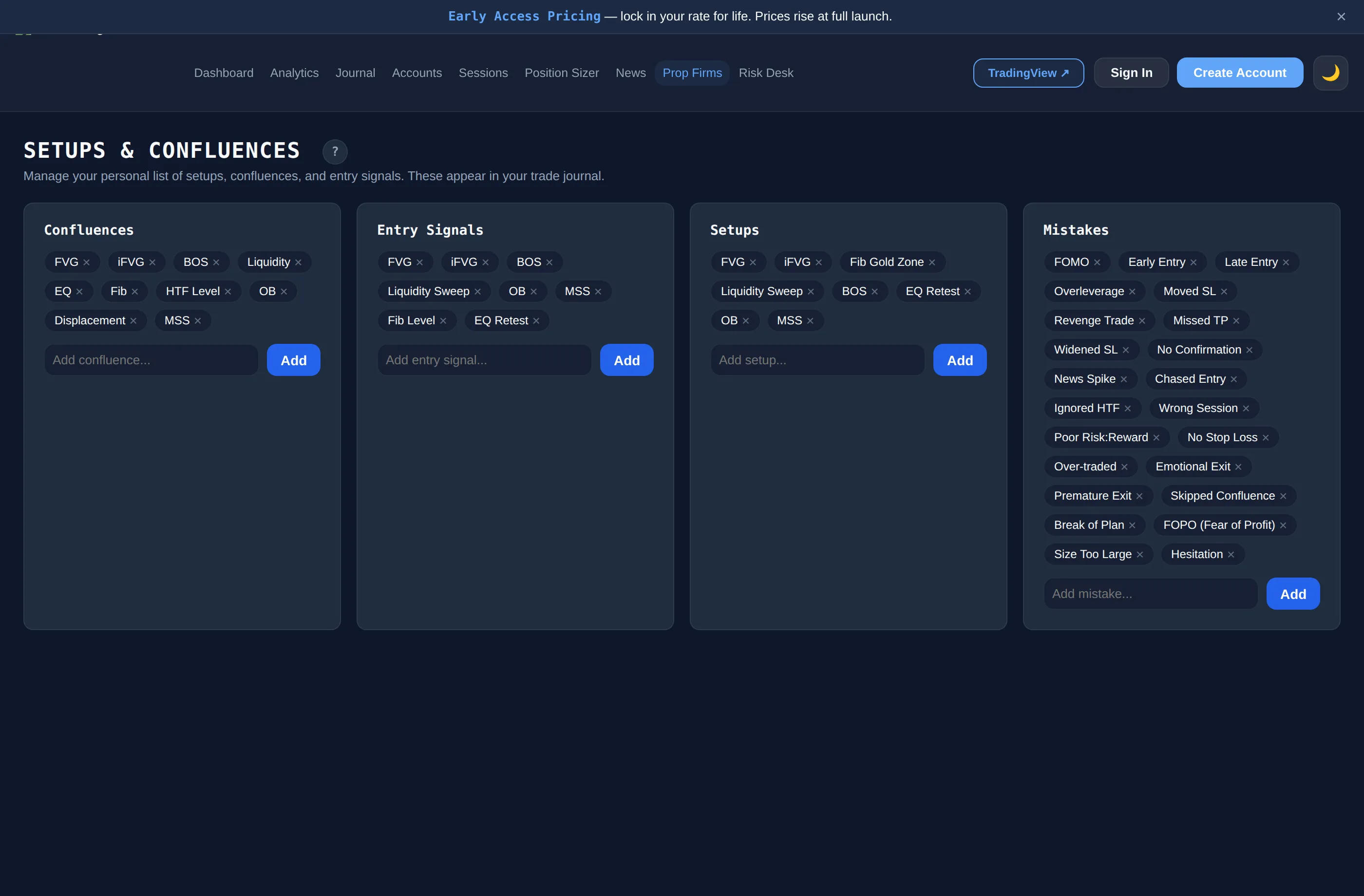
What it does not do: it does not detect gaps or order blocks, mark charts or generate signals. You decide the labels. Everything it reports comes from closed trades, and nothing on this site is financial advice.
Is there a free ICT trading journal?
Yes, two ways. The Trading Terminal's Free plan is A$0 with no card: the full trade journal and the Setups & Confluences manager for 1 account, up to 30 trades a month and 90 days of dashboard history, with CSV import and export. See the free trading journal page for the full list and the limits. The Analytics page, Trader DNA and Risk Desk need a paid plan.
Or use the spreadsheet. The free ICT template is an Excel workbook with the columns above, a drop-down for killzone, bias, liquidity and entry model, and a Summary sheet with win rate, expectancy and results by killzone, entry model, liquidity and whether the trade was with or against your stated bias.
Download the ICT trading journal template (.xlsx)
Free, no sign-up. Row 6 is a fictional example. No macros and no links to other files. In Google Sheets use File > Import > Upload.
What can a smart money concepts journal teach you?
A smart money concepts journal pays off when you ask it questions it can answer from your own data:
- Which entry model has the best expectancy over at least a few dozen trades, and which one only feels good?
- Do trades taken with your stated bias do better than trades against it?
- Which killzone do you lose in, and do you still trade it?
- How much do the trades where you skipped a confirmation add up to?
- Does a sweep of liquidity before the entry change your results, or is it a label you add afterwards?
Small samples mislead. Treat results from fewer than about thirty trades per tag as a prompt to keep logging, not a conclusion. The definitions of win rate, expectancy and profit factor are on the how we calculate page.
What mistakes make an ICT journal useless?
- Labelling with hindsight. Mark the model, bias and liquidity before you see the result, or take the screenshot at entry.
- Calling every gap a setup. If every trade is tagged FVG the tag tells you nothing. Split it by what made the gap valid.
- Not logging losers or skipped trades. The sample then shows only what worked.
- Changing killzone or bias definitions mid-way. Change a rule on purpose, date it in the notes and compare before and after.
- Ignoring timezone and daylight saving. Imports let you pick a timezone; use the same one throughout.
For the general guide to what goes in an entry, see what to write in a trading journal. Instrument pages that pair well with this one: forex trading journal, futures trading journal and indices trading journal.