
Free Trading Journal: Log Every Trade With No Card Needed
The Trading Terminal's Free plan is a free trading journal with no card required: log trades, tag setups and mistakes, and review them on a dashboard. It covers 1 account, up to 30 trades a month and 90 days of dashboard history, with CSV import and export. No ads. Updated 18 October 2026.
By Harrison Weaver, founder of The Trading Terminal
What is a free trading journal?
A free trading journal is a trading log you can use without paying: either a spreadsheet or journal software with a free plan. It records each trade and what surrounded it, such as the setup, session, risk and your emotional state, so you can review your own results instead of relying on memory. Free versions usually limit trades, accounts or history.
The limits matter more than the price tag. A journal that stops accepting trades half way through the month, or hides everything older than a few weeks, stops being a journal. That is why this page spells out exactly what The Trading Terminal's Free plan includes and where it ends. For the wider guide to keeping a journal at all, read the trading journal guide.
What is included in The Trading Terminal's free trading journal?
These are the inclusions and limits of the Free plan, taken from the app's own plan table (checked 12 October 2026).
| Feature | Free plan |
|---|---|
| Price | A$0. No card to sign up, no ads |
| Trading accounts | 1 (live, demo, prop firm or backtest) |
| Trades | Up to 30 per calendar month, counted by trade date. CSV imports count |
| Dashboard history | Last 90 days (Pro and Elite show all-time) |
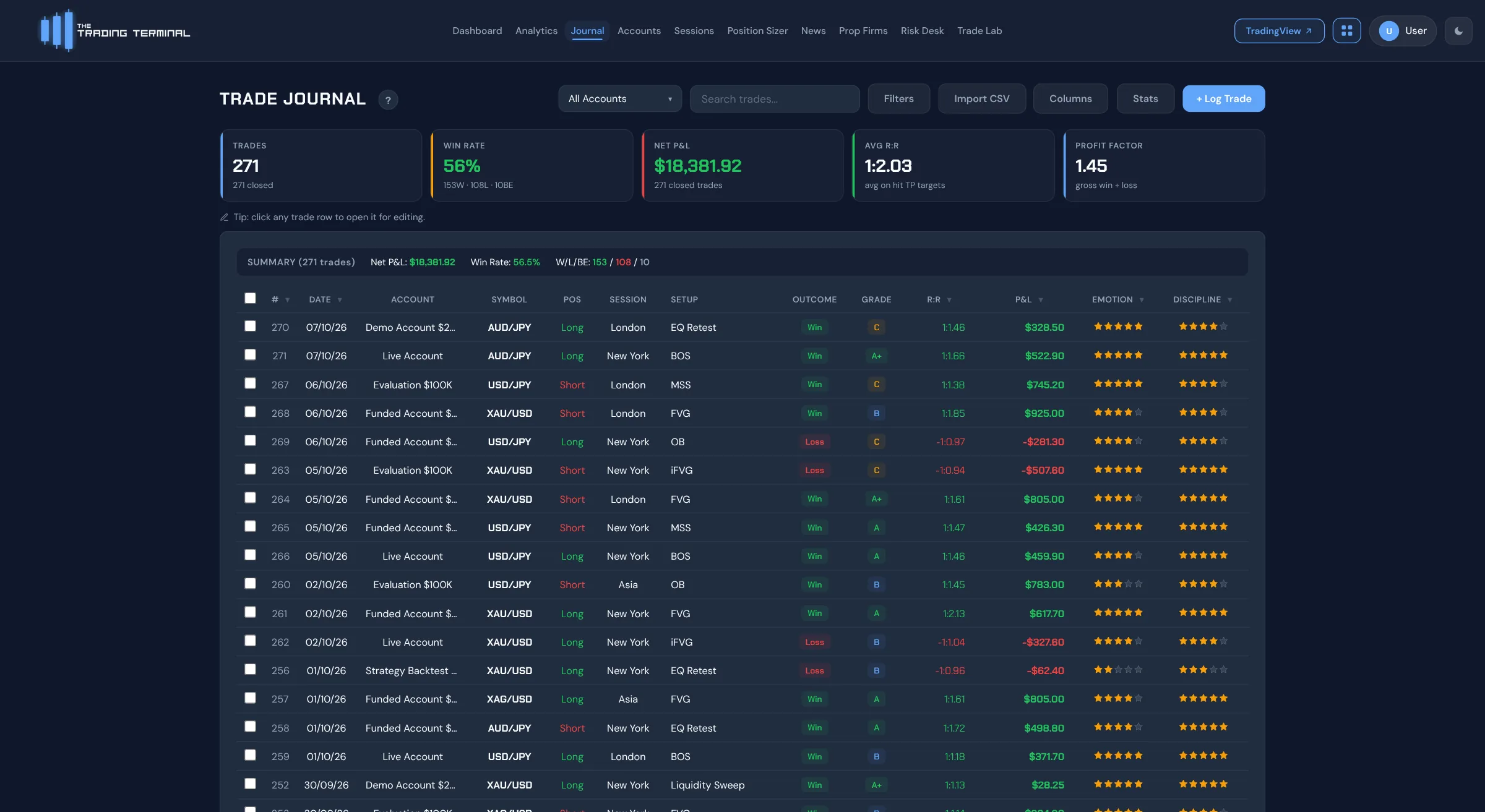
| Trade journal | Entry and exit, position, session, multiple setups and confluences, mistakes, grade, emotion and discipline ratings, notes, take-profit levels |
| Screenshots | 1 per trade (Pro and Elite: up to 5) |
| Dashboard and P&L calendar | Included, with day-by-day drill-down |
| CSV import and export | Included. Presets for MT4/MT5, cTrader and Tradovate, plus a generic layout |
| Position sizer, economic calendar, market sessions | Included |
| Setups & Confluences manager, prop firm info | Included |
| Search, filter and sort the journal | Included |
What are the limits of the free plan?
Free is a complete journal with no trial period, but it has hard edges:
- One account. Pro covers 3 accounts and Elite is unlimited.
- 30 trades a month. The cap is per calendar month and counts imported trades. When you reach it you wait for the next month or upgrade.
- 90 days on the dashboard. Pro and Elite show all-time history.
- No Analytics page. The 60+ analytics views, Mistake Cost Analysis, Trader DNA and Edge Score are on Pro and Elite. Risk Desk, Trade Lab and automatic imports from cTrader and MT4/MT5 are Elite only.
- What is not offered on any plan: AI features, trade replay and a native mobile app. It is a browser-based journal.
Prices if you outgrow it, in Australian dollars: Pro A$19 a month or A$189 a year, Elite A$29 a month or A$249 a year. Elite has a one-time 7-day trial that needs a card; the Free plan does not. Compare plans on the pricing page.
What should you check before choosing a free trading journal?
- Trade cap. A cap per month changes how you journal. Thirty trades suits a swing trader or a selective day trader; a high-volume scalper will reach it quickly.
- Account cap. One account is fine until you run a live and a prop firm account side by side.
- History window. Check whether older trades are hidden or removed, because the review of a whole quarter needs all of it.
- Import and export. You should be able to bring trades in and take your data out. Importing should be read-only.
- Business model. Free tools are paid for somehow. Look for ads, data sales or an upgrade path you are comfortable with. The Trading Terminal shows no ads on any plan and does not sell trading data.
- Fields that explain a trade. Price and P&L alone cannot tell you why a trade worked, so look for setup, session, mistake and emotion fields.
How does the free plan compare with other free trading journals?
Competitor plans change often. These rows show what we last recorded for each, with the date. Only The Trading Terminal's row was checked today, against the app itself. We have not ranked them: the right tool depends on your broker, your markets and how you review trades. Disclosure: this page is published by The Trading Terminal.
| Journal | Free plan | What we recorded | Last checked |
|---|---|---|---|
| The Trading Terminal | Yes, A$0 | 1 account, 30 trades a month, 90 days of dashboard history, CSV import and export | 12 October 2026, from the app |
| TradeZella | No | No free plan and no free trial. Paid plans from US$35 a month | 5 October 2026, TradeZella pricing |
| TraderSync | No | Free plan removed; 7-day trial, no card. Paid plans from US$29.95 a month | 5 October 2026, third-party review |
| TradesViz | Yes, limited | Free tier covered stocks only (1 account, 3,000 executions a month); forex needed a paid plan | 14 September 2026, not re-checked |
| Myfxbook | Yes | Free forex and CFD account analytics with MT4/MT5 sync; not a setup-by-setup journal | 14 September 2026, not re-checked |
| Edgewonk | No | Annual fee of about US$197 with a 14-day money-back guarantee | 14 September 2026, not re-checked |
| Spreadsheet | Yes | Free and flexible, but every statistic is a formula you maintain | See the free templates below |
Competitor prices are in US dollars and The Trading Terminal's are in Australian dollars; we do not convert between them. Confirm any competitor detail on its own website before you rely on it. See best trading journals for the full comparison and best free trading journals for free plans only.
Is there a free trading journal template for Excel or Google Sheets?
Yes. If you would rather start in a spreadsheet, the free trading journal template is an .xlsx workbook with working formulas for win rate, expectancy and profit factor. It opens in Excel, and you can open it in Google Sheets by uploading the file. There is also a version for each market and style below. A spreadsheet is a sound starting point; it just has a ceiling once you want to slice hundreds of trades by setup, session and mistake.
Which free trading journal fits your market?
The journal is the same on every market, but what you log and what you review differs. Pick the page that matches how you trade:
How do you start a free trading journal in five minutes?
- Create a free account with your email address. No card is asked for.
- Add your account in the Accounts manager and choose its type: live, demo, prop firm or backtest.
- Open Setups & Confluences and list the setups and mistake tags you actually use, so tagging a trade is a click.
- Log your first trade, or import closed trades from a CSV export of MT4/MT5, cTrader or Tradovate.
- Open the dashboard at the end of the week and review it. The habit matters more than the tool, and the guide on what to write in a trading journal shows what to put in each entry.
Everything the journal calculates uses closed trades, and nothing on the site is financial advice: it describes your own history.