
An Interactive Brokers Trading Journal That Imports Through Flex Queries
Create an Activity Flex Query and a Flex Web Service token in IBKR, paste them into Connections, and your closed stock, futures, options and forex trades import into the journal every day. A Flex token can only download reports, so it cannot trade or move money. Updated 26 October 2026
How the Interactive Brokers Connection Works
Open Connections, find the Interactive Brokers card, and follow the short steps on the card. Nothing has to be running on your side once it is connected, so it works from your phone and does not need a VPS, a laptop left on or an Expert Advisor.
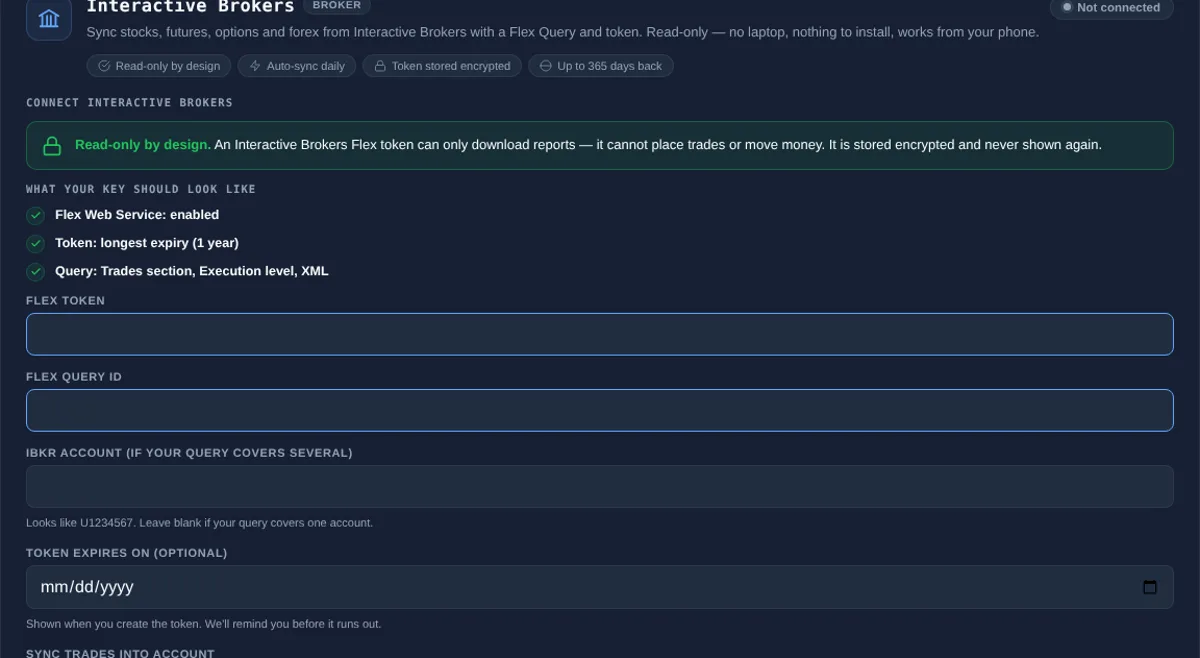
- Create a Flex Query. In the IBKR Client Portal open Performance & Reports, then Flex Queries, and create an Activity Flex Query with the Trades section at Execution level. Choose XML, UTC and the last 365 days.
- Create a token. In Flex Web Service Configuration turn the service on and generate a token with the longest expiry. Note the expiry date.
- Paste them in Connections. Choose Interactive Brokers, paste the token and the Query ID, add the expiry date if you want a reminder, then pick the account and start date. Do this once per IBKR account.
- Sync. Your history imports in a few moments, then new trades sync once a day after IBKR finishes its overnight statement. Sync now pulls the latest available.
Read-Only, Checked Twice
A Flex token can only download reports, so there is no permission to set. It is read-only by design.
- The token only downloads the reports you defined in the query.
- Only IBKR-hosted report addresses are ever followed.
- Every request is a read. The Trading Terminal never places, changes or closes an order and never moves funds.
- Credentials are stored encrypted, are never shown again and are deleted when you disconnect.
What Gets Imported
Only closed trades are imported. Individual fills are grouped into round trips, so a position built up over several orders becomes one trade in the journal. A Flex Query covers up to 365 days, so a first sync can go back that far.
| Field | How it is filled |
|---|---|
| Symbol and direction | Stocks, futures, options and forex; long or short; options show expiry, strike and put or call |
| Quantity | Filled quantity, with contract multipliers applied for futures and options |
| Entry and exit price | Quantity-weighted average of the opening and closing executions |
| Open and close time | First opening execution and last closing execution, stored in your own timezone |
| Commission | IBKR commission included in the net result |
| Net P&L | Gross result minus commission, in the trade currency |
Everything else, such as setup, confluences, mistakes, emotion, grade, notes and screenshots, you add in the journal. Synced trades never overwrite your notes, grade or tags, and syncing the same trade twice never creates a duplicate.
What It Does Not Do
- It does not place, modify or close trades, and it does not move funds or change broker settings.
- Open positions, until they close.
- Trades from today until IBKR finishes its overnight statement.
- More than 365 days of history in one query, which is the longest a Flex Query covers.
- For other platforms see the cTrader trading journal, MT5 trading journal and MT4 trading journal pages, or import a CSV.
What You Can Analyse Once Trades Are In
Synced trades feed the same analytics as any other trade: trading analytics such as Trader DNA, the Edge Score and Mistake Cost Analysis, and Risk Desk for daily loss limit and drawdown tracking from your closed trades. Pair it with the crypto trading journal guide for how to journal a market that never closes.